How Modular Asset Libraries for 3D Rendering Enable 72-Hour ArchViz Delivery
Modular asset libraries for 3D rendering enable 72-hour ArchViz delivery by removing the sourcing stage from the schedule. Instead of hunting, downloading, and repairing models mid-project, artists pull pre-vetted, correctly scaled, render-ready pieces from a shelf. That shifts roughly 30 hours of prep into 3 hours of assembly, leaving the remaining time for lighting, revisions, and final output.
Losing a Full Day to Asset Hunting? Outsourcing 3D rendering services gives studios access to ready-to-use asset libraries and experienced artists, helping cut sourcing time and keep 72-hour delivery on track.
What Is a Modular Asset Library in 3D Rendering?
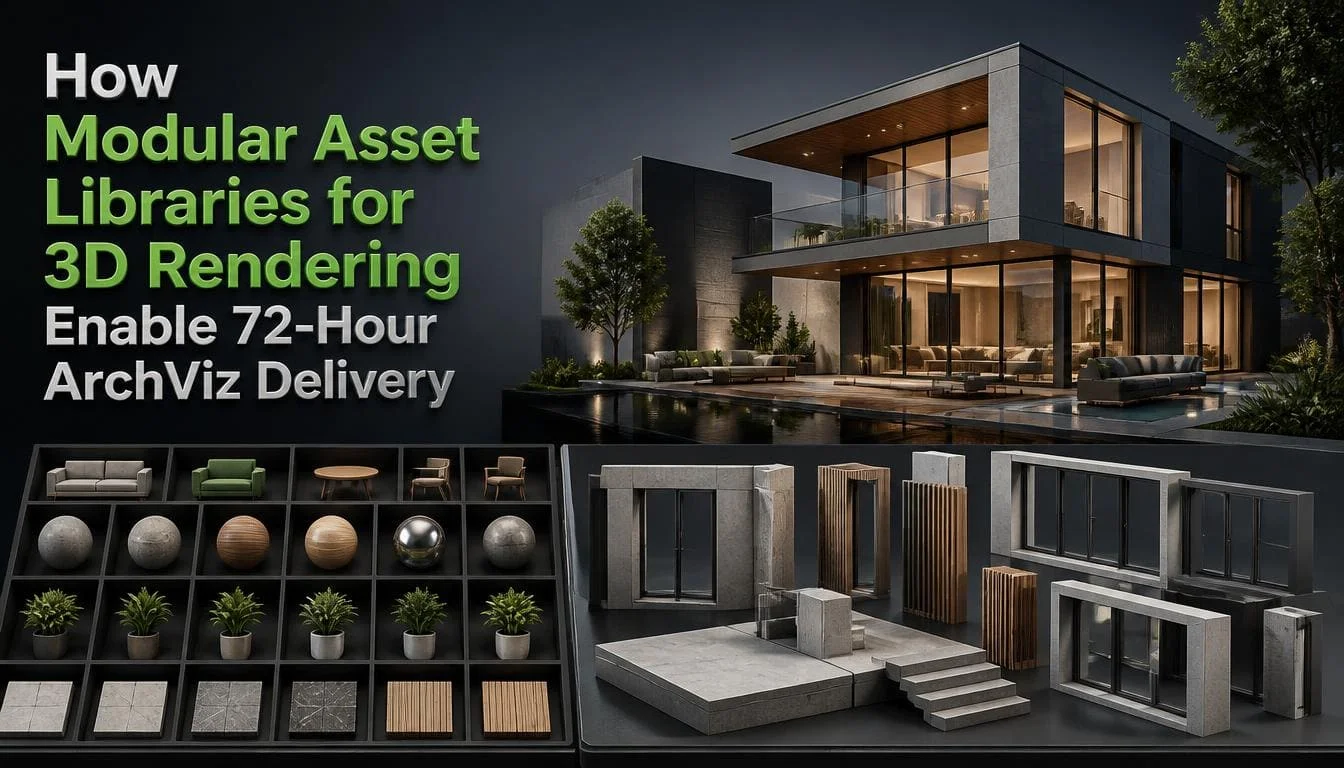
A modular asset library is a curated, reusable collection of 3D pieces built to snap together and drop into any scene without cleanup. Every item shares the same units, scale, pivot placement, naming rules, and material setup, so it behaves the same way in every project.
The word “modular” matters. A folder of downloaded sofas is a pile of files. A modular library is a kit: walls, floor slabs, ceiling panels, window frames, door assemblies, and railings that align to a fixed grid, plus furniture and decor tiers that sit on top of that kit.
Most asset libraries for architectural rendering stop at the second part. They give you objects. They do not give you the structural building blocks that let you assemble an apartment shell in 40 minutes.
Three things separate a real library from a download folder:
- Consistency: One unit system, one material standard, one naming rule.
- Snapping: Kit pieces built on a fixed increment (100 mm is the common choice) so they never leave gaps.
- Metadata: Every asset carries its poly tier, license, and source, recorded before it enters the library.
Why Does Asset Sourcing Take Up So Much of an ArchViz Timeline?
Asset sourcing consumes the timeline because each downloaded model costs about 40 minutes of handling before it renders correctly. D5 Render’s 2026 workflow breakdown splits that into roughly 10 minutes searching marketplaces, 3 minutes downloading and importing, 10 minutes discovering broken scale or missing textures, and 20 minutes rebuilding PBR materials by hand.
Now apply that to a real interior. A furnished living room hero shot typically carries 40 to 60 placed assets.
| Assets placed | Cold sourcing (~40 min each) | Library pull (~4 min each) | Hours saved |
| 20 | 13.3 hours | 1.3 hours | 12 |
| 40 | 26.7 hours | 2.7 hours | 24 |
| 60 | 40 hours | 4 hours | 36 |
Those saved hours are the whole 72-hour story. Nobody is rendering faster. They are simply not spending a full work week reconnecting texture maps.
The second cost is invisible until it hits you. Every fixed asset is fixed once, for that project only. Next month, a different artist downloads the same sofa and repeats the same 40 minutes. Studios that never centralize their fixes pay the same tax forever.
How Do Modular Asset Libraries for 3D Rendering Cut Delivery to 72 Hours?
They cut delivery to 72 hours by converting four slow phases into fast ones. Each phase has a specific mechanism, not a vague “efficiency gain.”
1. Scene Setup Becomes a Template, Not a Build
A saved template scene opens with units, gamma, color space, render presets, camera rigs, and output naming already configured. That is 60 to 90 minutes recovered before any modeling starts.
2. Blockout Becomes Assembly
Grid-aligned wall, floor, ceiling, and opening modules snap together from a CAD underlay. A one-bedroom interior shell goes up in well under an hour because nothing is being modeled, only placed.
3. Set Dressing Becomes Drag-and-Drop
Pre-fixed furniture and decor arrive with the correct scale, correct pivots, and working materials. No repair loop.
4. Revisions Become Swaps
When a client asks for a warmer sofa or a different kitchen island, a library-based scene answers with a variant swap in three minutes. A hand-modeled scene answers with a remodel.
The logic is not unique to CGI. A December 2025 systematic review of 58 studies in the Journal of Building Engineering found that standardization and prefabrication in modular construction improve design-process efficiency, and that a module library database enables reuse and further streamlines design generation. Physical modular construction and digital scene assembly run on the same principle: standardize the part, then stop redesigning it.
What Does a Real 72-Hour ArchViz Schedule Look Like?
A real 72-hour schedule allocates about 30 hours to production, 20 hours to rendering and post, 12 hours to client checkpoints and revisions, and 10 hours of buffer. Here is how a two-image interior package runs in practice.
| Hours | Stage | What the library handles |
| 0–2 | Brief lock and file audit | Template scene opens pre-configured; CAD checked for units and scale |
| 2–6 | Structural blockout | Grid-snapped wall, floor, ceiling, window, and door modules |
| 6–8 | Camera and composition | Saved camera rigs at delivery aspect ratios |
| 8–10 | Checkpoint 1: clay views sent | Client approves layout before dressing begins |
| 10–20 | Set dressing | Furniture and decor dropped as proxies, not full meshes |
| 20–26 | Lighting and materials | HDRI presets plus a master material library |
| 26–30 | Region test renders | Low-res checks on glass, metal, and fabric only |
| 30–34 | Checkpoint 2: draft render sent | — |
| 34–44 | Revision round 1 | Variant swaps instead of remodeling |
| 44–56 | Final render | Proxies keep RAM low; farm nodes read shared paths |
| 56–64 | Post and compositing | Saved LUTs and comp templates |
| 64–70 | Checkpoint 3: minor fixes | — |
| 70–72 | Export and delivery | Naming convention plus delivery preset |
Two rules make this schedule hold. Checkpoint 1 happens before any dressing because relayouting a scene costs six hours and relayouting a clay scene costs 40 minutes. And revisions are capped at two rounds inside the window, agreed in writing before hour zero. Genuine 72-hour render delivery is a scheduling discipline supported by a library. It is not a rendering speed claim.
Render time is a separate lever. If hours 44 to 56 are the block that keeps overrunning, a library will not fix it, and you need to know how to reduce rendering time in V-Ray, Lumion, and Blender before any three-day schedule holds.
Which Asset Libraries Should You Start With?
Start with one free CC0 source, one photoreal scan source, and one furniture source. Modular 3D assets for ArchViz can cover most of the recurring furniture, materials, and environment elements needed for residential and commercial scenes.
Poly Haven
- Best for: HDRIs, PBR materials, natural props
- Cost model: free, CC0
- Real-time ready: yes
Fab (Megascans)
- Best for: photoreal scanned rock, foliage, surfaces
- Cost model: free starter pack, then per asset
- Real-time ready: mixed, often high-poly
Chaos Cosmos
- Best for: V-Ray and Corona-native furniture and vegetation
- Cost model: bundled with license
- Real-time ready: yes
3D Sky / Evermotion
- Best for: designer and European furniture depth
- Cost model: per model or subscription
- Real-time ready: no, needs optimizing
TurboSquid / CGTrader
- Best for: rare and branded one-off items
- Cost model: per model
- Real-time ready: varies by seller
SketchUp 3D Warehouse
- Best for: early massing and concept only
- Cost model: free
- Real-time ready: no quality control
Megascans and Polyhaven libraries are the usual starting pair, and they solve different halves of the problem. Poly Haven covers lighting and surfaces. Megascans cover scanned exterior context. Neither covers interior furniture, which is why a third source is mandatory for interior work.
Poly Haven is the safest first pick for client work. Its assets are released under CC0, which the license page describes as effectively public domain, with no attribution required and commercial use permitted. You can browse their Polyhaven modular 3D assets and drop them into a paid deliverable with zero paperwork.
What Breaks a 72-Hour Delivery, and How Do You Prevent It?
Five things break a 72-hour delivery. Here is each risk and the fix that prevents it.
- Risk: the client’s CAD arrives late or broken. Prevention: make hour 0–2 a hard gate. No CAD, no clock start.
- Risk: the client keeps asking for more revisions. Prevention: contract two rounds inside the window and quote every extra change separately.
- Risk: textures use absolute file paths. Prevention: keep the library on a shared network path, use relative paths on every asset, and confirm with one farm test frame.
- Risk: polycount bloat crashes the final render. Prevention: assign a poly tier when the asset enters the library, and proxy anything you scatter.
- Risk: nobody owns the library. Prevention: name one librarian and schedule a 90-minute cleanup every month.
The last row is where most studios fail. A fast 3D render workflow decays within a year if no one owns maintenance. Assets get dumped in the root folder, naming drifts, three versions of the same chair appear, and artists go back to searching marketplaces because searching the library got slower than Google.
Bottom Line
Modular asset libraries for 3D rendering enable 72-hour ArchViz delivery because they delete the slowest, least creative part of the pipeline. The rendering is not faster. The searching, importing, rescaling, and texture repair simply stop happening. Build in tiers, gate everything through QA, log every license, and give one person ownership. Three days becomes a normal deadline instead of a rush.
Frequently Asked Questions
Q1: How Many Assets do I need before a library saves time?
About 40 to 60 well-prepared assets covering your most common shot type. That is enough to dress a standard interior without downloading anything mid-project.
Q2: Does a modular library work for exteriors as well as interiors?
Yes, often with even bigger savings, since trees, vehicles, and street furniture repeat a lot and benefit from proxy instancing, letting one shared mesh replace hundreds of costly copies. Keep a separate environment tier with seasonal material variants per plant.
Q3: Can I use free CC0 assets in commercial client renders?
Yes, CC0 assets are basically public domain, so commercial use is fine with no attribution needed. Still, log each asset's license when adding it, since not all free assets are CC0 and some sites host models with no rights checks.
Q4: Will clients notice that I reused assets across projects?
Usually not, as long as materials and layout are varied instead of repeated exactly. The real risk is a standout piece, like a unique light fixture, appearing in two published renders in the same market, so track and avoid reusing recent hero assets.